Scattered Thoughts on Trying SDD
As AI tools like GitHub Copilot, Cursor, and Claude settle in as everyday development tools, the agent doing the coding is slowly changing. Where a developer used to write every line by hand, now you describe what you want built and the AI produces the code. These days that approach gets called vibe coding.
The biggest shift vibe coding brings is speed and scope. With the AI handling the code you used to write over and over, the distance from an idea to working code got much shorter. One person can cover more ground, and developers can spend more of their attention on overall direction and structure instead of fine-grained implementation.
That doesn't mean vibe coding solves everything. Today's LLM-based tools have a few structural limits, and it's hard to use AI well without understanding them.
Three Structural Limits of AI Tools
First, hallucination.
This is when the AI writes code using functions or libraries that don't exist as if they did. The output looks plausible enough that it's easy to wave through, but run it and you get an error or nothing works at all. The trickiest part of this problem is that the AI is confidently wrong.
Second, the "lost in the middle" phenomenon.
The longer a conversation or context gets, the more the AI tends to effectively ignore what's in the middle. It refers to the beginning and the end just fine, but an important condition or requirement you tucked into the middle quietly drops out. The more complex the project, the more this stands out.
Third, context limits.
As a conversation accumulates, the AI starts forgetting earlier material or its quality degrades. Open a new chat and all the previous context is gone; keep one chat going and response quality wobbles. This is also the problem you run into most often when working on a long project with AI.
A Way to Ease the Limits: SDD
So is there a way to mitigate these limits, at least somewhat? The concept worth looking at here is SDD, Spec Driven Development.
SDD is exactly what it sounds like: before you hand the code off to the AI, you write a sufficient spec first. You document what feature you're building, what structure you're designing toward, and what conditions have to hold, then have the AI work from that spec.
Here's how that connects to the three problems above.
The clearer the context, the less the AI hallucinates. The vaguer the request, the more the AI fills in the blanks itself and invents things that aren't there; with a concrete spec in place, that room shrinks.
The same goes for lost in the middle. If the important conditions are organized in a spec document, you can shore up the context even in a long conversation by pointing the AI back at that document.
In the end, SDD is the work of drawing the blueprint up front so you can direct the AI better. Which also means: the more it's the AI writing the code, the more a developer's ability to write a good spec matters.
Spec Kit: A Tool That Helps You Write Specs
The thing is, writing the spec itself often leaves you unsure where to start. While looking around for help with that, I found Spec Kit — an SDD support tool GitHub open-sourced in September 2025, a CLI toolkit that gives structure to the whole development flow from writing the spec to implementing it.
Spec Kit's development flow is made up of eight stages.
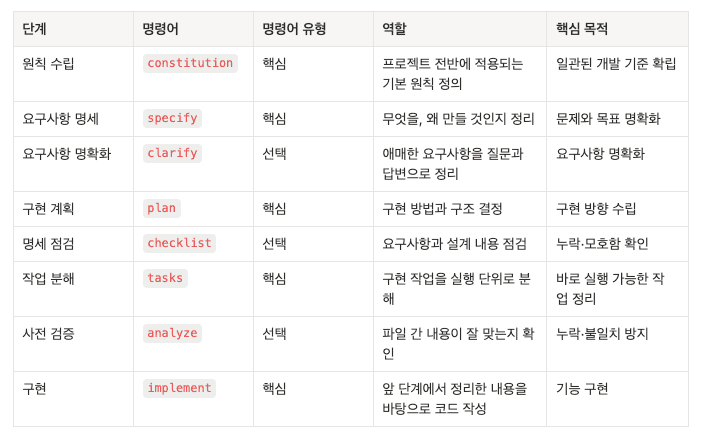
The key is that the developer reviews and approves each stage directly. Instead of receiving thousands of lines of code all at once, you move forward checking small, broken-down outputs as they arrive, which lets you catch problems early and correct course.
Trying It and Getting Banged Up
To learn SDD, I applied Spec Kit — which is meant to help you learn SDD — and built a program with it. What follows is what I noticed along the way.
/constitution — Writing the Project's Constitution
The first command you type when starting with Spec Kit is /constitution. As the name says, this stage creates the project's constitution: the document of principles that every development decision is measured against.
The output looks like this.
# Galaxy Board Constitution

### I. 3D Performance First
- Maintain 30fps or above
- Cap of 50 planets per page, 100 stars per planet

### VI. Test First (TDD) — NON-NEGOTIABLE
- Write tests before implementing any feature
- Strictly follow the Red-Green-Refactor cycle
...
It's a document that organizes the principles the project has to uphold, item by item. It covers technical constraints (which libraries to use), development workflow (commit granularity, branch rules), and governance (how this document itself gets amended). From then on, the AI judges every stage against this document.
Using it is simple. You hand the AI the rules that have to hold. I asked it like this:
"These are the rules this project has to follow. (list of rules) Make a constitution based on this."
And the document above came out as the very first result.
What's interesting is that it's a living document. If, partway through development, you decide "Storybook stories are non-optional," you call /constitution again and add the principle. The version gets bumped, and it even sorts out which templates are affected, automatically.
Version change: 1.1.0 → 1.2.0 (MINOR - 1 principle added)
Added principles:
  - VIII. Component stories required
Building a constitution for a development project on this basis, and heading off the AI's odd behavior with it, was very interesting.
/specify — Nailing Down What You're Building
If the constitution is the principles for "how you build," /specify is the stage for organizing "what you build."
Rather than dumping the entire project in at once, I split it up by feature. I wrote the project setup spec first, and once it was implemented, wrote the spec for the next feature, and so on.
Here's how you use it. You type /specify and feed it a feature list, like sprint tickets.
"I'm going to build a galaxy planet board"
- Posts are galaxies, likes are stars, comments are satellites
One convenience here: type /specify and Spec Kit automatically creates a branch and saves spec.md inside the matching folder. You never have to create or manage the files yourself.
specs/001-galaxy-board/
└── spec.md   ← generated automatically
The important thing is that this stage doesn't write down "how to implement it." Specify focuses only on WHAT and WHY. How to implement gets decided in the next stage, /plan.
/clarify — Asking About What I Hadn't Thought Of
Once spec.md is out you'll want to jump straight to /plan, but it's better to pass through /clarify first. It's the stage where the AI reads the spec, finds the ambiguous parts itself, and asks you about them.
Quite a few things I hadn't considered came out of this stage.
• How many posts (planets) should be shown on one screen? • How far does planet customization go? Color only, or can the shape change too?
These are obvious things, really, but the kind you skate past while writing a spec. Having /clarify point them out makes you go, "ah, I should have decided this before moving on."
Answer here and the answers get reflected in spec.md, which becomes the reference for later stages. Skip this stage and the AI will make those calls on its own during /plan or implementation — and its calls may not match your intent.
/plan — The AI Designs It for You
/plan is the stage that designs the actual implementation based on what specify and clarify pinned down.
You don't have to pass a file or point at a path. Type /plan and Spec Kit reads spec.md from the relevant folder on its own, does research, and produces plan.md.
The output looks like this.
# Implementation Plan: Galaxy Board

**Branch**: `001-galaxy-board` | **Date**: 2026-03-25 | **Spec**: [spec.md](./spec.md)
**Input**: Feature specification from `/specs/001-galaxy-board/spec.md`

## Summary

An interactive board implementing a galaxy (topic), planet (post), and star (like) system in a
Three.js-based 3D space. A monorepo project made up of a NestJS backend (hexagonal architecture)
and a Next.js frontend (FSD structure).

## Technical Context

**Language/Version**: TypeScript 5.7+, Node.js 22 LTS
**Primary Dependencies**:
- **Frontend**: Next.js 15.x, React 19, Three.js 0.183.x, @react-three/fiber 9.x, @react-three/drei 10.x, Zustand 5.x, TanStack Query 5.x, react-hook-form 7.x, Zod 3.x, shadcn/ui, Tailwind CSS 4.x
- **Backend**: NestJS 11.x, Prisma 6.x, class-validator 0.15.x, class-transformer 0.5.x

**Storage**: PostgreSQL 16 (Docker), Prisma ORM
**Testing**: Jest 29 + @testing-library/react (frontend), Jest 29 + Supertest (backend E2E), SWC-based transpile
**Target Platform**: Modern browsers with WebGL support (latest 2 versions of Chrome, Firefox, Safari, Edge), desktop first
**Project Type**: Web application (monorepo: apps/api + apps/web + packages/*)
**Performance Goals**: 30fps or above (scene with 50 planets + 500 stars), initial load within 3s, transitions within 1s
**Constraints**: max 100 stars per post, 50 planets per page, fallback when WebGL is unsupported
**Scale/Scope**: desktop browser users, support for many galaxies/posts

## Constitution Check

*GATE: Must pass before Phase 0 research. Re-check after Phase 1 design.*

| Principle | Status | Notes |
|------|------|------|
| I. 3D Performance First | ✅ PASS | Caps set at 50 planets/page, 100 stars/planet. Pagination applied |
| II. User Experience Centered | ✅ PASS | Camera animation transitions, overlay panel UI, intuitive interactions |
| III. Simplicity (YAGNI) | ✅ PASS | Only the CRUD + 3D visualization needed now. Auth/edit/delete excluded |
What I found especially interesting is that the AI came back with a checklist of its own. It pulled out the principles declared in the constitution one by one, verified for itself whether the design upholds each one, and summarized pass/fail in a table.
Looking at this output, I worked out the parts that needed changing through conversation. It wasn't perfect from the start, but because there were reference documents (constitution, spec), it never shot off in a bizarre direction.
/tasks — Breaking the Work Down
When /plan is done you type /tasks. It reads plan.md and all the other design documents and breaks the work into the smallest implementable units, producing tasks.md. There's nothing to hand over; you just type the command.
The output looks like this.
## Phase 1: Setup (project initialization)
- [ ] T001 Define Galaxy, Planet, Star models in the Prisma schema
- [ ] T002 Create and apply the Prisma migration
- [ ] T003 [P] Define shared types (Galaxy, Planet, Star)
...

## Phase 3: User Story 1 — Exploring galaxies (topics)
- [ ] T026 [P] [US1] Write GalaxyService unit tests
- [ ] T027 [P] [US1] Write PlanetService.findByGalaxy unit tests
...
It's split by phase, and each task comes with the exact file path attached. Tasks marked [P] can be handled in parallel, and the dependencies — which task has to wait on which — are laid out too. Because I had declared TDD NON-NEGOTIABLE in the constitution, every implementation task came out with a test-writing task in front of it.
/implement — The AI Develops While Checking Tests
Type /implement and it looks at tasks.md, writes tests first, and implements while getting them to pass — running the Red-Green-Refactor cycle itself.
Here I learned one limit the hard way.
Test code guarantees the program's behavior; it doesn't explain my intent.
No matter how carefully you write the spec, once several features stack up, parts of it start to conflict with earlier plans. But the AI doesn't know that. It only needs the tests to pass. So you get implementations that work functionally but diverge from the intent of the plan, or cases the developer never thought of quietly going missing.
In the end, even at the /implement stage the developer has to look at the output and judge it. The AI getting the tests to pass isn't the finish line; you have to check "is this actually what I wanted?" every time.
Retrospective
- I'd used AI tools like GPT and Cursor before, but Claude Code's speed and versatility were on another level. I felt in my hands that the share of code I type myself will keep shrinking. At the same time, I clearly felt that you can't get lax about reviewing the code the AI produces. The AI getting tests to pass isn't the end — asking "is this what I wanted?" every time, and owning the answer, ended up being the developer's job.
- Spec Kit itself is an excellent tool. What I liked most is that it imposes some discipline on people who aren't used to SDD. A bit like React: by forcing a certain way of doing things, it guarantees output above a certain level. But just as not every app needs React, you can pick it according to the size and purpose of the project. You don't need React for a simple calculator app.
- There was one practical lesson too: Spec Kit collided with another plugin and created a strange folder. It reminded me that agreeing up front on which tools the team uses matters more than you'd think.
Reference Links
- Spec Kit
- Spec Kit review (Korean)
- Spec Kit development process (Korean)
- Vibe coding with Spec Kit's spec driven development (Korean)
- SDD experiment repo